

Kinnaur Kailash yatra halted amid rains and route damage

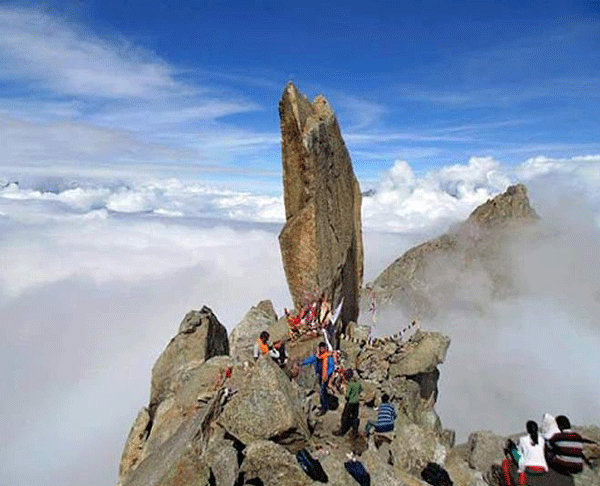
Photo used for indicative purpose
Kinnaur, Aug 6,
The Kinnaur Kailash Yatra 2025 has been temporarily halted following continuous heavy rainfall that has severely impacted the pilgrimage route, the district authorities confirmed on Wednesday. The Sub-Divisional Magistrate (Civil) of Kalpa, Amit Kalthaik, stated that critical portions of the yatra trail have become hazardous for travel. In particular, footbridges across the Tangi Valley and Kangyarang rivulets have been swept away by rising water levels, while other stretches of the path have turned dangerously slippery due to incessant rain and repeated landslides.
With these developments rendering the route unsafe for movement, the administration has decided to suspend the yatra until further notice. Emphasizing the priority of safeguarding lives, SDM Kalthaik informed that all pilgrims currently on their way have been stopped at safe points and are being cared for. He urged devotees and visitors not to attempt any travel towards Kinnaur Kailash until conditions stabilize and the pilgrimage route is officially reopened.
Meanwhile, the local administration has mobilized efforts to ensure the safety of those already in the area, while simultaneously monitoring both weather conditions and the structural integrity of the path. Restoration and safety review work has begun, although persistent rain may delay progress.
The Kinnaur Kailash Yatra holds deep spiritual importance, drawing pilgrims from far and wide. However, in light of the current situation, officials reiterated the need for public cooperation and patience. Pilgrims are advised to follow only verified information from official sources and refrain from acting on rumors or unofficial reports.
About the Author

The HimachalScape Bureau comprises seasoned journalists from Himachal Pradesh with over 25 years of experience in leading media conglomerates such as The Times of India and United News of India. Known for their in-depth regional insights, the team brings credible, research-driven, and balanced reportage on Himachal’s socio-political and developmental landscape.













Yes! You can get Alight motion apk on Mac. Install any android emulator on your Macbook, Download the Alight motion apk from Alightapp.pro. Install the downloaded file on emulater and launch the application after installing. ⑥ Enjoy playing Alight Motion — Video and Animation Editor on your PC or Mac with MuMuPlayer. Well, this top-trending video and anime editor is designed for Android and iOS-based software, but in this guide, we describe how to install it for PC. Following our step-by-step guide, download Alight Motion APK for PC to experience the up-to-date features of 2024 on a bug screen. Look for Alight Motion in the search bar at the top right corner Yes, the app IS available for Mac. You can install the Macbook downloader file on an Emulator and install it. You might be wondering whether we can install Alight Motion on a PC. The answer is yes. Alight Motion Pro is compatible with Android, Windows, PCs, and iOS devices. In this article, I am giving you a complete guide to installing Alight Motion Pro on a PC.
https://ardec.ca/en/profile/UJH67
October 23, 2025 APK4Fun © 2025 • About Us • Contact Us • Submit App • Privacy Policy • DMCA Policy PrettyUp is a video body editing tool designed to enhance and refine your appearance in videos. It utilizes advanced AI technology to smooth skin, adjust body shape, and improve overall aesthetics. Users can automatically apply filters, retouch specific body parts, and customize their look with ease. PrettyUp is suitable for content creators, influencers, and anyone looking to enhance their video presentations. The intuitive interface allows for quick edits, making it accessible for both beginners and experienced users. With PrettyUp, you can achieve a polished and professional look in your video content effortlessly. Install PrettyUp- AI Body Editor Video app on your Windows in 4 steps below:
I like the accidental vintage look, but I hope that you don’t get a wrong impression: both Flowblade and Cinelerra are capable of handling color video of course, it’s just that my demo video looks nearly gray-scale or black and white due to a misconfigured white balance on a sunny day. Stay connected: Have a perfect song for a perfect moment captured in a video? With Clideo, you can easily combine them into a memorable clip! – Video stabilizer- New transition pack: Paint- Bug fixes and other improvementsAny ideas or suggestions? Don’t hesitate to contact us at inshot.ios@inshot.For more new feature tutorials and advanced video editing tips, please subscribe to our YouTube channel @InShotApp Clean up your audio or video podcast, in a few clicks. Support of a large number of video effects, color correction, object transformation and application of video filters to video files and images. You can create your own effects by combining available effects and filters.
https://doks.komun.org/s/L2OHxD5Z80
Funimate is a popular video editing app for casual video editors who need a decent selection of features. TikTok users often use this app to edit their one-minute videos because it offers better functionality than the TikTok editing platform. More tools like this: iOS video editing app | Android video editing app | Chromebook video editor app | Desktop video editor As always, if you have questions or comments, drop them here or hit me up on the Twitter @smartfilming. If you like this article, also consider subscribing to my free Telegram channel (t.me smartfilming) to get notified about new blog posts and receive the monthly Ten Telegram Takeaways newsletter about important things that happened in the world of mobile video. You don’t need to worry about the formats anymore as Clideo is compatible with all the modern image, audio and video formats.